

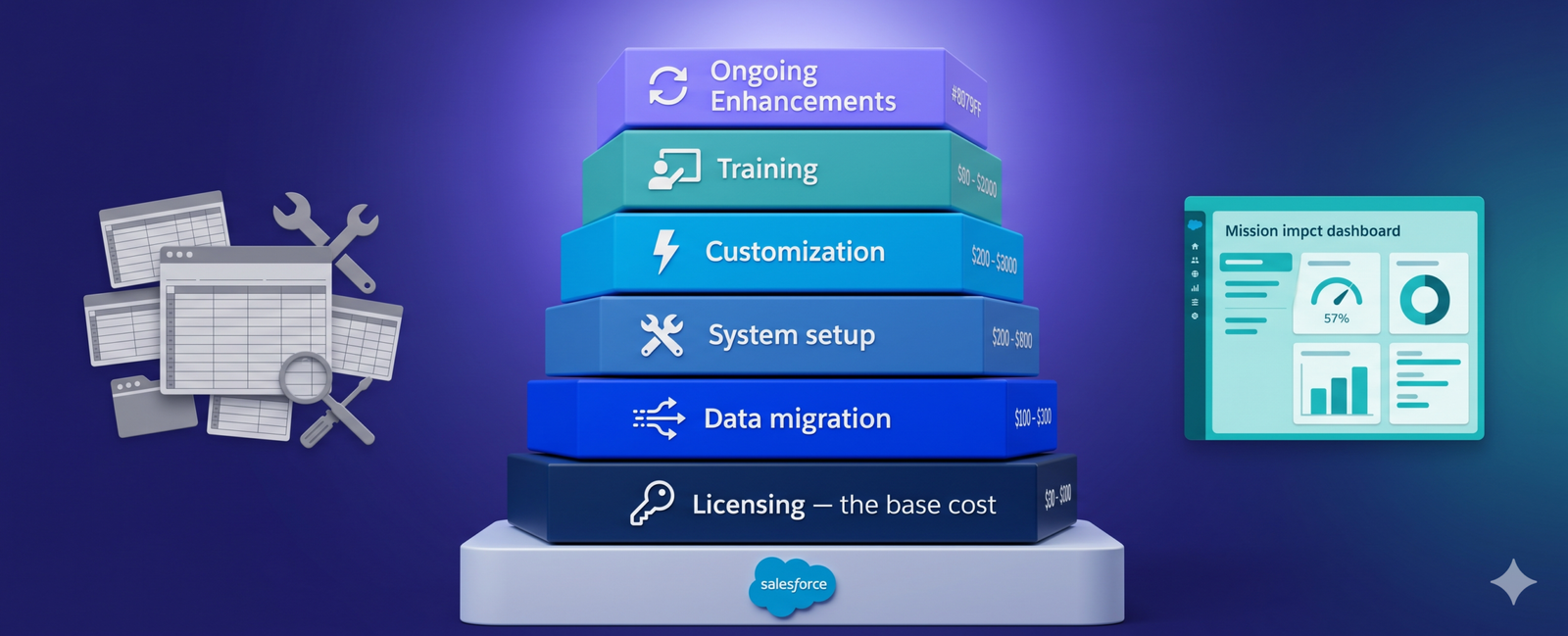
For modern nonprofits, digital transformation is no longer optional; it is the engine for impact. Yet, the transition to a sophisticated ecosystem like Salesforce often triggers fiscal apprehension. While the platform promises a 360-degree view of constituents, the path to a successful Salesforce Nonprofit Cloud consulting engagement requires clear visibility into Total Cost of Ownership (TCO).
Ambiguity regarding implementation costs and post-go-live support is a common hurdle in board-level discussions. To move from uncertainty to a data-driven strategy, organizations must look beyond initial licensing and evaluate the full lifecycle of their investment.
The challenge is that many organizations underestimate the full scope of a CRM implementation. Overlooking it can cause projects to stall, suffer from adoption, and be questioned by leadership.
In this guide, we will break down the real components of nonprofit Salesforce budgeting. You will dive into estimating costs and plan for sustainable growth, that too without financial surprises.
Focusing solely on “sticker price” is a high-risk approach. A comprehensive budget ensures that the platform is treated as a strategic asset rather than a line-item expense. Proper planning allows you to mitigate risks associated with data integrity, user adoption, and technical debt.
In other words, thoughtful Salesforce budgeting that nonprofits conduct early in the process allows organizations to treat technology as a strategic asset.
Nonprofits operate in diverse ways. Some organizations focus heavily on fundraising and donor relationships, while others manage large community programs, grants, volunteers, and service delivery.
Because of this diversity, Salesforce offers multiple products that organizations can use depending on their needs, operational structure, and growth plans.
Each product focuses on different capabilities, from donor management and fundraising to program tracking and stakeholder engagement.
Understanding these options is essential before making a technology investment.
In 2026, the landscape has shifted significantly between legacy and native solutions:
While these platforms all operate within the Salesforce ecosystem, their pricing structures vary depending on features, user licenses, and customization requirements. They usually offer special nonprofit programs and discounts, which make these solutions more accessible.
However, organizations should still evaluate the full cost of ownership, including implementation, training, and ongoing system improvements.
Many organizations assume that the main cost lies in purchasing licenses alone. Meanwhile, the reality is very different. An effective Salesforce budget involves several interconnected components that extend beyond the initial subscription.
A robust Salesforce implementation budget accounts for the entire ecosystem. From ETL (Extract, Transform, Load) processes to stakeholder training, each component is vital for long-term ROI.
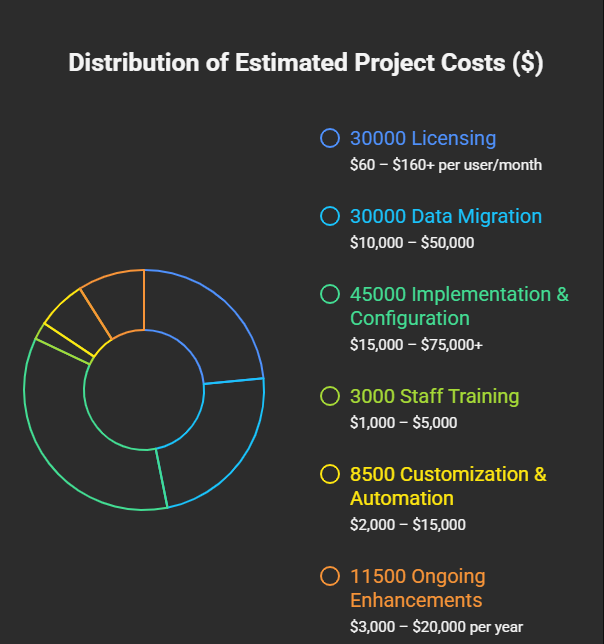
Cost Category | Estimated Cost Range |
Licensing | $60 – $160+ per user/month (After discount) |
Data Migration (ETL & Cleanup) | $10,000 – $50,000 |
Implementation & Configuration | $15,000 – $75,000+ |
Staff Training | $1,000 – $5,000 |
Customization & Automation | $2,000 – $15,000 |
Ongoing Enhancements | $3,000 – $20,000 per year |
Below are seven key components nonprofits should include when planning their Salesforce budget.
Licensing is usually the first expense organizations consider when planning a Salesforce budget.
While Salesforce offers donated or discounted licenses for nonprofits, many organizations still require additional paid subscriptions depending on the size of their team.
You should carefully evaluate both current staffing needs and expected growth before deciding how many licenses to purchase.
Nonprofits store years of donor records, fundraising history, and program data in spreadsheets or older CRM systems. Moving this information into Salesforce requires careful preparation to maintain accuracy and usability.
A successful Salesforce migration often involves auditing existing data, cleaning duplicate or outdated records, mapping fields between systems, and testing the imported information to ensure everything functions correctly. You need to follow a proper plan to avoid time-consuming and costly data migration.
Every charity has different workflows, fundraising strategies, and operational structures. As a result, you must configure the platform so it reflects their specific processes.
Implementation costs often include system setup, configuration of objects and fields, creation of workflows, and development of dashboards.
It transforms your generic platform into a customized solution that supports mission and day-to-day activities.
It is non-negotiable to invest in deeper customization and automation to improve efficiency.
Custom workflows will automate donor communications, schedule follow-up tasks, or trigger notifications when specific actions occur.
At the same time, automation helps staff save time and reduce manual work while ensuring important processes happen consistently.
These enhancements require careful planning and technical expertise, which makes them another important budgeting consideration.
Even a powerful platform like Salesforce can fail to deliver results if staff members feel confused. For this reason, nonprofits must include training as a key part of their technology investment.
Training may involve onboarding sessions for staff, role-specific instruction for different departments, and internal documentation. Those who invest in proper training help staff members become more confident users.
Your charity will definitely rely on a variety of digital tools to support its operations. It may span email marketing platforms, online donation systems, and accounting software.
Integration of such systems allows you to automatically move data between platforms, eliminating manual data entry and reducing errors.
However, integrations often require technical configuration or third-party applications, which can influence the overall Salesforce pricing.
Salesforce is not a static system that remains unchanged after implementation. It is a dynamic platform designed to evolve alongside organizations’ growth.
As a nonprofit, you should allocate a budget for feature upgrades, regimented automation, security updates, and more.
Keeping in check with these improvements from the beginning lets you treat Salesforce as a dynamic platform. Rather than letting the system become outdated, you can keep a modern, responsive platform.
You can easily manage your nonprofit technology investment more effectively by following several best practices.
First and foremost, you should start with clear goals. Define what you want Salesforce to accomplish. It may be to improve donor engagement, fundraising workflows, or program impact, or anything else.
Prioritizing scalability by flexible licensing and implementation. It benefits you with the system to grow alongside the organization.
Your core leadership should involve both technical teams and program staff during the planning stage. This is because their insights ensure the platform supports real operational needs.
Last but not least, if possible, do hire experienced Salesforce professionals who understand nonprofit workflows. They reduce implementation errors and optimize the overall Salesforce pricing strategy.
Salesforce offers nonprofits an opportunity to modernize operations, strengthen donor relationships, and measure real impact. Yet the success of any implementation begins with thoughtful financial planning.
By carefully evaluating the cost of nonprofit licensing, estimating a realistic migration budget, and making ongoing enhancements, Salesforce can become a powerful operational engine.
View Salesforce not as a software purchase, but as a multi-year investment in organizational scalability. With the right roadmap, your CRM becomes a catalyst for mission-critical growth.
For nonprofits seeking the best results, it is wise to connect with experienced Salesforce experts. Based on expertise, they will leave no stone unturned while keeping your costs balanced.