
Every nonprofit operates differently. Your donor journeys, grant cycles, volunteer programs, and reporting needs are unique.
That’s why simply installing Salesforce isn’t enough. Without proper Salesforce Nonprofit Customisation, you are using only 40% potential of this powerful technology.
In fact, Salesforce becomes truly powerful only when you Customise Salesforce Nonprofit systems around your mission, fundraising model, service delivery, and reporting needs.
An ‘out-of-the-box’ implementation often fails to capture the nuanced workflows of program delivery, leading to high technical debt and poor user adoption without effective Salesforce Charity Customisation.
Yet without intentional customisation, most of the non-profits end up with cluttered records, confusing dashboards, and frustrated staff due to poor Nonprofit CRM Customisation Salesforce practices.
We are going to discuss a step-by-step approach to Salesforce customisation and the common mistakes you must avoid in Salesforce Donor Management Customisation.
By the end of this blog, you will surely be able to build a system that actually supports growth, transparency, and impact through Salesforce Nonprofit System Customisation.
Effective Salesforce configuration begins with a Discovery Phase. Before creating a single custom field, you must map your ‘As-Is’ processes against the native Nonprofit Cloud objects to avoid redundant development in Nonprofit Salesforce Customisation.
Most fail to do effective customisation because their Siloed technical builds often overlook the day-to-day operational realities of fundraisers and program managers, resulting in a system that records data but doesn’t drive action. For clarity, ask yourself:
Those who map their real-world processes first and then go for Salesforce NGO Customisation achieve better reflection of their needs.
For instance, if you are using Nonprofit Success Pack or Salesforce Nonprofit Cloud, review what already exists. Understanding the features before building anything new is going to help you avoid duplicates in Salesforce Nonprofit Customisation.
Most nonprofits use either the Nonprofit Success Pack or Salesforce Nonprofit Cloud. Both restructure Salesforce around how charities actually function and support Salesforce Charity Customisation.
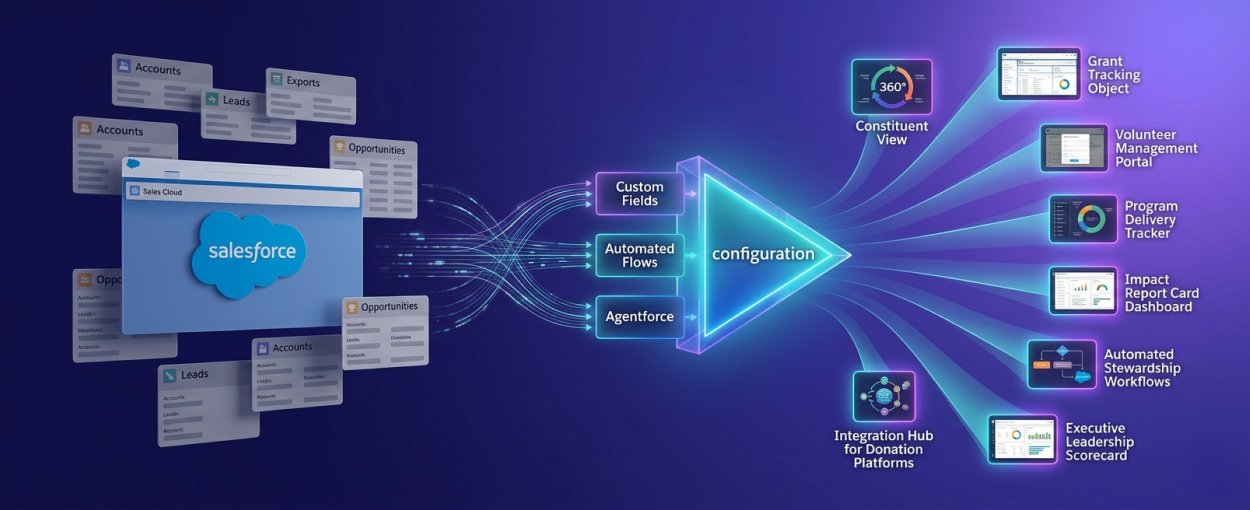
For organizations still on a legacy Sales Cloud architecture, the first step is migrating to the Person Account-based data model used in Salesforce Nonprofit Cloud. This aligns your system with modern industry standards for 360-degree constituent views in Nonprofit CRM Customisation Salesforce.
It matters a lot because traditional Salesforce uses corporate terminology like Accounts, Leads, and Opportunities.
Meanwhile, your nonprofit CRM setup restructures the system around how charities actually work, improving Salesforce Donor Management Customisation.
In short, it transforms a generic sales tool into a mission-aligned system that reflects the real-world structure of your organisation through Salesforce Nonprofit System Customisation.
Your data model is the backbone of your CRM. If you get this wrong, reporting, automation, and fundraising insights will always feel messy in any Customise Salesforce Nonprofit strategy. Adhere to a ‘Lean Schema’ philosophy. Every custom field should have a defined ‘Business Purpose’ and ‘Data Owner.’ In 2026, cluttered schemas don’t just confuse humans; they degrade the accuracy of AI reasoning engines.
These custom fields in Salesforce help your team make informed decisions and strengthen Salesforce Nonprofit Customisation. What you should avoid are “just in case” fields. They seem harmless at first, but over time, they clutter records, confuse users, and weaken reporting accuracy.
Custom objects will also be required to organise this data properly. As you build, maintain consistent naming conventions and document every addition to support long-term Nonprofit Salesforce Customisation. Future admins (or even future you) will thank you.
Stop letting users enter “N.Y.,” “New York,” or “NY” in a city field. Use Picklists (drop-down menus) to force consistency as part of Salesforce NGO Customisation. Suddenly, you have four versions of the same state, and reporting becomes messy.
Picklists solve this problem. They limit entries to predefined options, which keeps your data consistent and reliable in Nonprofit CRM Customisation Salesforce. Instead of cleaning spreadsheets at year-end, your system stays organised from day one.
Clean data means your year-end reports will take five minutes instead of five days. This small piece of Salesforce configuration saves hundreds of hours annually in Salesforce Nonprofit System Customisation.
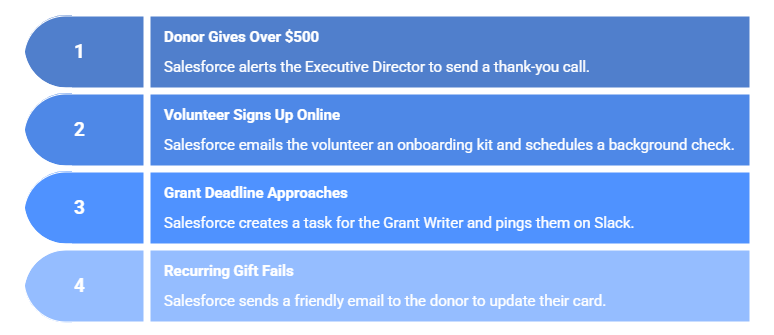
Here comes an important yet interesting aspect of Salesforce customisation. Build smart workflows for your nonprofit to eliminate repetitive tasks and focus on what matters most in Salesforce Donor Management Customisation.
|
If This Happens… |
Salesforce Automatically Does This… |
|
A donor gives over $500 |
Alerts the Executive Director to send a personal thank-you call. |
|
A volunteer signs up online |
Emails them an onboarding kit and schedules a background check. |
|
A grant deadline is 30 days away |
Creates a task for the Grant Writer and pings them on Slack. |
|
A recurring gift fails |
Sends a friendly “Update your card” email to the donor immediately. |
Use Salesforce Flow for deterministic logic and Agentforce for probabilistic tasks. For example, use Flow to automate Gift Aid declarations, but use Agentforce to draft personalized donor stewardship emails based on that data.
With automated, proactive systems, your team spends less time on manual admin and more time on high-impact work, strengthening your Salesforce Nonprofit Customisation strategy.
Data stuck in spreadsheets or buried in reports doesn’t help anyone. Your leadership team needs clear, actionable insights at a glance in Nonprofit Salesforce Customisation.
In that case, a dashboard becomes paramount for a non-profit. Just ensure it includes the fundraising thermometer, donor retention rate, and volunteer capacity.
When designed thoughtfully, it will transform your nonprofit CRM from a data repository into a strategic tool aligned with Salesforce NGO Customisation goals.
The key to successful Salesforce customisation is when it is connected to your system through effective Salesforce Charity Customisation. You should ensure that everything from email marketing platforms, donation systems, accounting software, event management tools, and SMS services remains integrated with it.
Once integration is complete, it will automate all your critical processes, like flowing your donations directly into Salesforce. Moreover, you will enjoy synchronizing financial data with your accounting system, and much more in Nonprofit CRM Customisation Salesforce.
Most importantly, nonprofits eliminate duplicate data entry, reduce the margin of error, and ensure up-to-date information in Salesforce Nonprofit System Customisation.
Don’t make changes directly in your live Salesforce database. You should always use a Sandbox to build and test new features as part of Customise Salesforce Nonprofit best practices.
This cutting-edge platform lets you create fields, experiment with nonprofit workflows, validate automations, and run sample reports in Salesforce Nonprofit Customisation.
With controlled testing, nonprofits identify and fix potential issues before they affect their day-to-day operations in Nonprofit Salesforce Customisation.
Never automate your entire organisation at once. Pick one process, like your thank-you letter workflow, and perfect it.
Once it is done and dusted, assess it thoroughly, then move on to the next. Gradual improvement leads to sustainable adoption in Salesforce NGO Customisation.
If your team doesn’t have deep technical expertise, partnering with a Salesforce implementation expert can save time, money, and headaches in Salesforce Charity Customisation.
Professionals can assess your existing Salesforce org, recommend best practices, clean up nonprofit data, and guide architecture decisions in Nonprofit CRM Customisation Salesforce.
Strategic Salesforce customization is a journey of iterative improvement. By focusing on data integrity and user-centric design, you ensure your CRM is a catalyst for your mission, not a hurdle for your team through effective Salesforce Nonprofit System Customisation.