

The Strategic Guide To Non-profit Salesforce Budgeting From Licensing To TCO
Design Trends / May 15, 2026
Salesforce Blog

If you are reading this, you might be in one of the following situations:
That is where a HubSpot to Salesforce migration comes in. Salesforce bends your CRM system to how your business functions and plans to grow. It connects to almost any system, platform, or tool.
However, moving CRMs is not just about copying data from your current CRM system and moving it to Salesforce. It gets complicated and needs the right approach and a certified Salesforce migration company to get it right.
Done wrong, you lose data, break integrations, and frustrate your team. Done right, you get a cleaner foundation and a platform you settle into for the long run.
This guide walks you through the full move. You will learn the core differences, the real reasons teams switch, common migration problems, and the exact steps for a smooth cutover.
Let's get right into it, shall we?
At core, both HubSpot and Salesforce are great CRM platforms. But they solve different problems.
HubSpot works for teams that require quick setup and ease of use. Salesforce works for teams that want a specialized CRM platform for their complex processes and specific industry, control, and automation needs, and growth initiatives.
Here’s a comparison that shows exactly how the two CRM platforms compare to give you a clearer perspective if HubSpot to Salesforce migration is the right move for your business now.
| Capability | Salesforce | HubSpot |
|---|---|---|
| Handling complex businesses | Built to match how your business actually runs, however unusual. It bends to you. | Simple to use because it is limited. Fine until your needs outgrow it. |
| Room to grow | Grows with you for years. You rarely outgrow it. | A great starting point, but many businesses hit their ceiling and have to move on. |
| Customizing your setup | Almost anything can be built and owned by you, shaped around your exact process. | You work within what the platform offers. Quick, but you adapt to it. |
| Connecting other tools | The largest app marketplace and the strongest connections, including older and industry-specific systems. | Connects well to popular tools, less so to complex or legacy ones. |
| Automation | Easy point-and-click automation that keeps going when your needs get advanced. No ceiling. | Easy drag-and-drop automation. Great for simple needs, limited beyond them. |
| AI | Agentforce agents take real action across your business, not just suggest text. Works best on clean data. | Quick to switch on. Handy, but lighter in what it can actually do. |
| Reporting | Starts capable and answers deep questions across products, regions, and teams. No separate tool needed. | Friendly out of the box, but struggles as your questions get more complex. |
| Trust and compliance | The platform banks, hospitals, and governments rely on. Meets the strictest security and audit rules. | Solid for most businesses, less proven in heavily regulated settings. |
| Ease for staff | Heavier to learn only if set up badly. Configured properly, teams use it happily every day. | Easy to pick up, which is its biggest strength. |
| Long-term cost | One platform you settle into and keep. No forced migration when you grow. | Lower upfront, but the cost of outgrowing it and moving later is real. |
Both Salesforce and HubSpot have different target audiences and user intent. HubSpot is built to be simple and easy to get started with. Salesforce is built precisely around your business processes and needs.
Below, we break down the core differences between HubSpot and Salesforce, so you can see where each platform fits and where it stops fitting.
Of all the feature differences between Salesforce and HubSpot, the one most likely to cause confusion during migration is Salesforce's Lead object.
HubSpot recently added Leads to its Sales Hub, but for many people moving to Salesforce, the Lead object still feels unusual at first, while long-time Salesforce users can't grasp how HubSpot ever worked without it.
A Lead is a standard Salesforce object that acts as a holding stage to validate data during the handoff between marketing and sales. Sales development representatives usually work Leads, dropping non-workable records, fixing missing data, and confirming the Lead is a real prospect.
Once qualified, the Lead is "converted," turning the record into an Account, a Contact, and optionally an Opportunity, with ownership passing from the SDR to the rep who'll run the deal. In short, the Lead keeps junk data out of your core database.
So, here are the decisions you'll need to make:
Should you use Leads?
It depends on your data and sales motion. You can probably skip Leads if you target a small set of high-quality accounts, like an ABM model aimed at deeptech companies.
But you should use them if you pull data from a marketing tool like HubSpot Marketing Hub or bulk-import from an aggregator like ZoomInfo, since Leads isolates unqualified data and protects your database.
How will you route Leads?
Whether you use Leads or just Contacts and Accounts, you need a way to assign new records.
HubSpot teams often build a round-robin with Workflows, but Salesforce has no native round-robin, so you'll need to pick an approach: build a custom round-robin in Salesforce, keep the HubSpot workflow active to control ownership, buy a third-party routing tool, or assign Leads manually.
The right choice depends on your record volume and budget, but you can’t move forward without a definitive plan.
When does an Opportunity get created?
Salesforce Opportunities are much like HubSpot Deals, and by default, one is created the moment a Lead converts into an Account and Contact.
You can turn this off; some teams prefer the SDR to book a meeting for the AE first, who then creates the Opportunity. As always, do whatever works best for your teams.
HubSpot connects well to popular marketing and sales tools. Its App Marketplace covers the common ones. However, it shows its lack when you need complex, legacy, or industry-specific systems.
Salesforce is built for this. AppExchange is the largest business app marketplace, with thousands of ready connectors. On top of that, Salesforce offers strong REST and SOAP APIs, plus MuleSoft for complex integration tasks.
This means Salesforce can sit at the center of your stack. ERP, finance, support, data warehouses, and custom apps can all feed into it. You get one source of truth instead of scattered tools.
For growing teams, this is often the tipping point. As your systems get more complex, HubSpot integration limits start to bother. Many users report that uncommon apps do not connect cleanly.
If integration depth matters to you, Salesforce gives far more room. Our Salesforce integration services handle these connections during the move.
AI is where the gap between the two platforms exists and is widening fast. HubSpot has Breeze AI, its built-in AI platform that drives automation across common sales, marketing, and service functions, along with offering some useful features. They are quick to switch on and useful for content and basic tasks. However, they stay fairly light in what they can actually do.
Salesforce takes a different path with Agentforce. These are not just chatbots. Agentforce drives end-to-end agentic AI automation across your processes, including complex, sensitive touchpoints. They can qualify leads, route cases, update records, and run multi-step workflows using native CRM tools.
This works because of Data 360, formerly Data Cloud. It unifies your customer data into one trusted profile. Agentforce then grounds every decision in that data, with the Einstein Trust Layer keeping it secure and governed.
There is one rule to remember: agents work best on clean data. That is another reason a careful migration matters. Migrate clean, well-mapped data, and your Agentforce makes the impact you’ve invested in Salesforce for.
This is where many teams hit a bottleneck. As it started as a marketing platform, HubSpot’s email, landing pages, and campaign tools are quite useful and intuitive. So a fair question comes up: will we lose that if we move?
The honest answer, no. While Salesforce is sales and service first, its capabilities extend to marketing, user experience, campaign automation, email marketing, and more. Everything exists as a separate product with its own capabilities.
For instance, Marketing lives in a separate product, Marketing Cloud or Account Engagement, formerly Pardot. So you gain far deeper CRM power, but marketing is a distinct module. It’s not baked in, so it offers far more features and functionality.
For many businesses that require a CRM system for specialized purposes, this is highly valuable. Sales gets a serious CRM. Marketing gets a tool built for scale. They connect through shared data.
This is also why some teams keep HubSpot for marketing and connect it to Salesforce. We cover that option later. Either way, plan your marketing setup before the move, so no campaign history goes missing.
Scalability is the reason most teams migrate to Salesforce. HubSpot is a great CRM platform for beginners. However, many businesses hit a ceiling as they grow. Contact limits, reporting limits, and customization limits start to slow the team down.
Salesforce is built to grow with you for years and provides specific functionality for every process, every industry. It handles large data volumes, complex workflows, and many users without breaking. You rarely outgrow it, because you can keep extending it.
Support also runs deeper. Salesforce has a huge global network of certified partners, developers, and admins. At Providus, you get access to certified talent who are a part of this network. So whenever you need assistance, Providus provides you with the expertise you need.
On the other hand, HubSpot’s expert pool is smaller, less specialized, and lighter on complex tasks.
Therefore, you need to think forward. The right question is not which tool fits now. It is which tool still fits in three years. For most scaling businesses, that answer points to Salesforce. Our Salesforce managed services keep it healthy long term.
Customization is where the two platforms part ways. HubSpot lets you adjust what the platform offers. It is quick, but you mostly work within its limits. Complex, personalized changes often need code or simply are not possible.
Salesforce reigns supreme here. Almost anything can be built and owned by you. You can create custom objects, custom fields, and validation rules. You can shape the data model around your exact process, not the other way round.
On top of that, you get tools like Flow for point-and-click automation, plus Apex code for advanced needs. So both admins and developers can extend the system safely.
However, this flexibility is a double-edged sword, though. Set up poorly, your new org feels confusing and badly planned. Set up well, it fits your team like a glove, and adoption happens naturally.
That is why a certified Salesforce migration partner like Providus matters. Our Salesforce development services ensure your org matches how you really work.
The data model is the quiet difference that affects everything. HubSpot uses a flat, simple structure. Contacts, Companies, Deals, and Tickets sit at the center. Associations link them, but the model stays fairly fixed.
Salesforce uses a relational model. Standard objects like Account, Contact, Lead, Opportunity, and Case connect through clear relationships. On top of these, you add custom objects for anything your business needs.
Why does this matter? Because structure drives reporting, automation, and AI. A clean relational model lets you ask deep questions and trust the answers. A flat model limits how far you can go.
This is also the heart of any HubSpot to Salesforce migration. Your HubSpot objects and properties must map to the right Salesforce objects and fields. Done well, your data gains a structure it never had. Done poorly, you carry old mess into a new CRM platform. Mapping is everything.
HubSpot is secure enough for most companies. It offers encryption and standard controls. However, it is less proven in heavily regulated and compliance-first settings.
Salesforce is the platform banks, hospitals, and governments rely on. It meets strict standards such as HIPAA, SOC 2, and more. If you work in finance, health, or the public sector, this depth matters a lot.
The control goes further with the sharing model. Salesforce lets you set exactly who sees what, down to the record and field. You can enforce role hierarchies, sharing rules, and field-level security. HubSpot's controls are simpler and less granular.
There is also a full audit history. You can track who changed what and when. This is vital for compliance reviews.
Therefore, if security and audit rules matter to your organization, Salesforce gives the depth regulators expect. We build these controls when setting Salesforce up for your business.
How you set up Salesforce decides how well it works. This is the biggest difference in practice. HubSpot is easy to start for startups and small companies. Salesforce, however, rewards proper planning and skilled teams working across complex processes in mid-sized companies and enterprises.
That is where the consultant network comes in. Salesforce has a large, certified partner ecosystem. You can find experts for any cloud, industry, or integration. So you are never stuck without help.
A certified partner does more than set up fields. They map your process, design the data model, plan the migration, and train your team. They also help you avoid the classic mistake: copying HubSpot's flat setup straight into Salesforce.
This is why teams that hire a partner see faster adoption and cleaner data. They get the platform configured for how they actually work.
As a certified Salesforce consulting partner, our implementation team handles this end-to-end, from first plan to go-live and beyond.
Salesforce is not just a CRM. It is a connected set of clouds that covers the whole customer relationship. This breadth is something HubSpot cannot match at the same depth.
Here is what that coverage looks like:
Because these clouds share one platform and one data core, your teams work from the one source of truth. Sales sees service history. Service sees the latest deal. Marketing sees both.
HubSpot bundles sales, marketing, and service, too. However, its depth in each area is lighter, especially for large or complex teams.
So as your needs spread across departments and business functions, Salesforce keeps everything in one place. You add clouds as you grow, without leaving the platform.
You do not move to Salesforce just because your competitors are. It’s a highly specialized CRM platform, and before migrating to it, it’s important to analyze whether Salesforce works for you.
Here are some reasons why teams migrate from HubSpot to Salesforce:
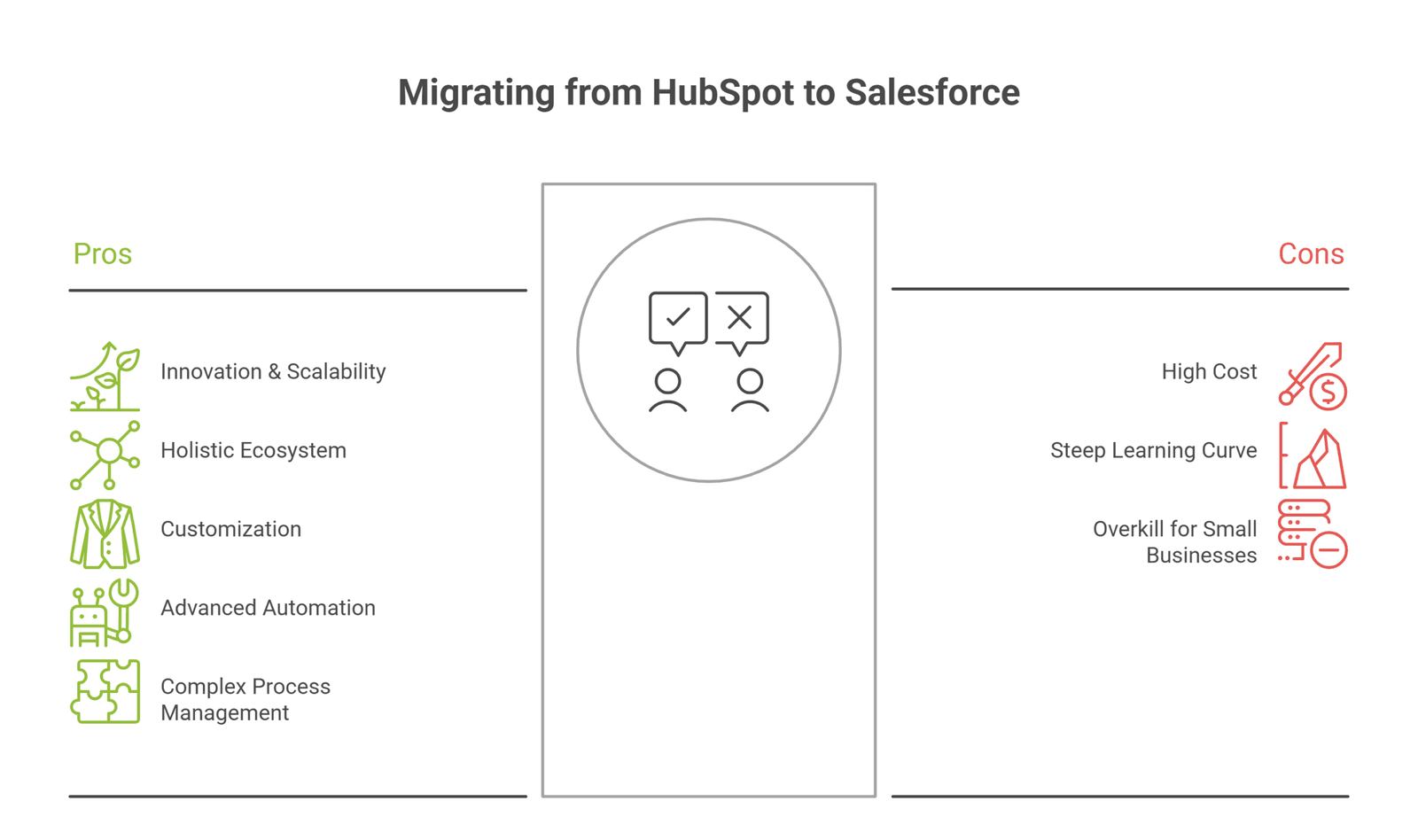
Salesforce ships three major updates every year. So you get new features without changing platforms. AI, automation, and analytics keep improving under you. HubSpot updates, too, but Salesforce sets the pace at the enterprise level.
Scalability is the bigger win. As discussed before, HubSpot can hit a ceiling. Contact-based pricing climbs. Reporting and customization limits appear. Many teams feel this exact squeeze as they grow.
Salesforce removes that ceiling. It handles more users, more data, and more complex processes without slowing down. You add objects, automations, and whole clouds as needed.
This means one platform can serve you for years. You stop replacing tools at every growth stage. Instead, you keep building on what you already own.
If you expect real growth, Salesforce protects that growth. You invest once and keep extending, rather than facing another painful switch later.
A CRM is only as strong as the ecosystem that surrounds it. Here, Salesforce leads by a massive margin. AppExchange offers thousands of apps. So whatever your need, a vetted solution likely exists.
This ecosystem covers more than apps. It includes Trailhead for free training, a global partner network, and one of the largest user communities. So answers, talent, and add-ons are always within reach.
HubSpot has a marketplace and community, too. However, both are smaller and shorthanded in complex, industry-specific needs.
Why does this matter? Because no single platform does everything. The strength is in the network around it. A bigger ecosystem means faster fixes, more talent, and more proven tools.
So when you move to Salesforce, you join more than a product. You gain a full support network that grows your options instead of limiting them.
We discussed this above, but it deserves its own focus. With Salesforce, you own your CRM platform. It’s built around your processes, needs, and scalability needs.
You can create custom objects for anything unique to your business. You can add custom fields, page layouts, and record types per team. You can enforce rules with validation logic, so bad data never gets saved.
Automation goes deep, too. Flow handles complex, point-and-click logic. Apex adds custom code when you need it. So simple and advanced needs both have a home. No CRM does automation quite like Salesforce.
Compare this to HubSpot, where complex changes often hit limits or need workarounds. Many users report exactly this friction as they grow.
The result is a system that fits your team. That fit drives adoption, because people use tools that match how they actually work. Good setup turns this power into real impact.
Sales automation is where Salesforce really pulls ahead. HubSpot offers easy drag-and-drop automation. It is great for basic needs. However, it gets limited once your logic grows complex.
Salesforce has no real ceiling here. Flow lets you build advanced, point-and-click automation. You can route leads, update records, send alerts, and trigger approvals across objects. When you need more, Apex code extends its functionality further.
On top of that, Einstein and Agentforce add intelligence. Einstein scores leads and predicts which deals will close. Agentforce goes further and takes action, not just suggestions. It can qualify leads and update your CRM on its own. This frees your reps from busywork and allows them to focus more on selling and making crucial decisions.
Therefore, if manual processes are slowing your team, Salesforce catalyzes them with intelligent, agentic automation.
Some businesses simply run in complex ways. Multiple teams, regions, products, and approval chains all at once. This is exactly where HubSpot starts to strain.
Salesforce is built for this complexity. Its relational data model maps to how your business really works. You can model many products against one account. You can set different sales processes per team or region.
Approvals are a strong example. Salesforce lets you build multi-step approval flows with conditions. So a deal can route to the right manager based on size, region, or product. HubSpot's logic is far simpler here.
Record types and page layouts add more control. Each team sees the fields and stages that fit their work. Nobody wades through screens built for someone else.
So if your processes have grown intricate, Salesforce bends to match them. It does not force your business into a fixed, one-size template.
Scattered data is a daily pain. Sales sees one thing, service another, and marketing a third. A move to Salesforce fixes this with a single, shared customer view.
Every interaction sits on one record. Calls, emails, cases, deals, and orders all in one place. So any team member sees the full story before they act.
Data 360 takes this further. It unifies data from across your systems into one trusted profile. This includes data outside Salesforce, like web, commerce, and finance tools. The result is a true 360° view of your customers.
Why does this matter? Because better context means better service and smarter selling. Reps stop asking customers to repeat themselves. Support resolves issues faster, with full history on hand.
This unified view also powers AI and reporting. Clean, complete data feeds better forecasts and stronger Agentforce results. One record, one truth, every team aligned.
Generic CRM orgs only go so far. Many businesses need features built for their specific industry and processes. Salesforce meets such needs with Industry Clouds, unlike HubSpot, which offers a generic solution to every business, regardless of their industry and business model.
These are prebuilt solutions for specific sectors. Examples include:
Each comes with data models, workflows, and compliance features made for that industry. So you start with relevant tools.
This saves time and reduces risk. You skip months of custom work because the sector logic is already there. You also get features that match the rules your industry follows.
We covered the ecosystem earlier. Here, the focus is on day-to-day fit with your other tools. This is a common reason teams leave HubSpot.
As businesses grow, their tool stack gets complex. ERP, finance, support, and custom systems all need to talk to the CRM. HubSpot connects to popular tools well. However, users often report that complex or uncommon apps do not link cleanly.
Salesforce handles this depth far better. AppExchange offers thousands of vetted connectors. Strong APIs cover custom links. MuleSoft manages heavier, system-to-system integration.
So Salesforce can sit at the center of your stack as one source of truth. Data flows in from every system, and every team works from the same records.
This compatibility protects you as you scale. New tools plug in without breaking what exists. Our integration team sets up and tests these links during the migration, so nothing drops.
Migrating from HubSpot to Salesforce is rewarding, but not risk-free. Most problems come from poor planning, not the platforms. So it helps to know the common challenges before you start. Below are the four that trip up teams most often, and what causes them.
This is the number one risk. HubSpot and Salesforce store data differently. So a clean map between them is vital. If you skip this, data lands in the wrong place or goes missing.
The core challenge is the model shift. HubSpot's flat Contacts, Companies, and Deals must map to Salesforce's Leads, Accounts, Contacts, and Opportunities. Custom properties in HubSpot must become custom fields in Salesforce.
Associations are another blind spot. HubSpot links records loosely. Salesforce uses strict relationships. If you ignore this too, you break the links between people, companies, and deals.
Data types cause quiet errors, too. A dropdown in HubSpot may not match a picklist in Salesforce. Dates, owners, and statuses can shift if not mapped with care.
Data mapping is the part that needs the most attention. Our certified Salesforce team builds a full field-by-field map and tests it before any of your sensitive data moves.
This concern is real and common. HubSpot holds rich marketing data. Email opens, page views, form fills, and lead scores. Teams fear losing this history in the move.
The risk is genuine because Salesforce is sales and service first. Much of HubSpot's marketing data has no direct home in core Salesforce. So without a plan, this intelligence can slip away.
However, you can move key marketing data into custom fields or objects. You can archive the rest for reference. You can also keep HubSpot for marketing and connect it to Salesforce, which we cover later.
The point is to decide on purpose. Choose what marketing history matters and where it should live.
So before you move, audit your marketing data. Map what you keep, archive what you do not, and protect the insight you have built. Plan it, do not lose it.
Your business cannot stop while you switch CRM. Yet a poorly run Salesforce migration can cause exactly that. Broken integrations and paused workflows hurt sales and service.
The risk shows up in connected systems. If your CRM feeds your website, billing, or support, those links must keep working. Cut them without a plan, and orders or cases can fall through.
Timing is the other risk. Move during a busy period, and disruption hits hard. Move without a fallback, and a problem has no safety net.
Good planning removes most of this. You run the new system alongside the old one first. You test every integration before going live. You pick a quiet window for the final switch.
Your new CRM org will only work for your business if your team actively uses it. This is the quiet challenge that sinks many such migrations. If adoption lags, no matter how feature-rich or scalable your new CRM org is, it won’t serve any purpose and drive value against your CRM investments.
The cause is usually change, not the platform. Teams know HubSpot and find it easily usable. Salesforce feels different at first. Without support, people resist or revert to old habits like spreadsheets.
A bad setup makes this worse. If Salesforce is configured poorly, it feels heavy and slow. Users then blame the platform when the real issue is the build.
The fix is part design, part people. Configure the system to match daily work. Keep screens clean and relevant per team. Then train users well and bring them in early.
These two terms get mixed up often. Here’s how they differ:
A HubSpot to Salesforce migration means moving off HubSpot. You transfer your data and processes into Salesforce, then make Salesforce your main CRM. Afterwards, you usually stop using HubSpot for CRM. It is a one-time move from one platform to another.
A HubSpot-Salesforce integration is different. Here, you keep both tools. You connect them so that data flows between them. Neither platform goes away. Instead, they work together, each doing what it does best.
So when does each make sense?
Choose HubSpot to Salesforce migration when you want one platform for everything. You have outgrown HubSpot. You need Salesforce's depth, customization, and reporting. You want a single source of truth and less tool sprawl over the long term.
Choose HubSpot-Salesforce integration when both tools earn their place. A common setup is HubSpot for marketing and Salesforce for sales and service. Marketing keeps its strong campaign tools. Sales gets a feature-rich CRM. The two sync contacts, leads, and activity through the native connector.
Many teams actually use integration as a stepping stone. They connect first, learn Salesforce, then migrate fully later. Others keep the split for good, because it suits how they run.
The right choice depends on your goals, budget, and team. There is no single answer. However, the question is simple: do you want one platform, or two that talk to each other?
We help teams decide and then deliver either path. Whether you need a full migration or a clean integration, the plan should match your business.
Once you commit to moving to a new CRM platform, the next question is how to migrate from HubSpot to Salesforce the right way.
There are three key methods. Each suits a different size, budget, and level of complexity. Below, we explain all three, so you can pick the right fit.
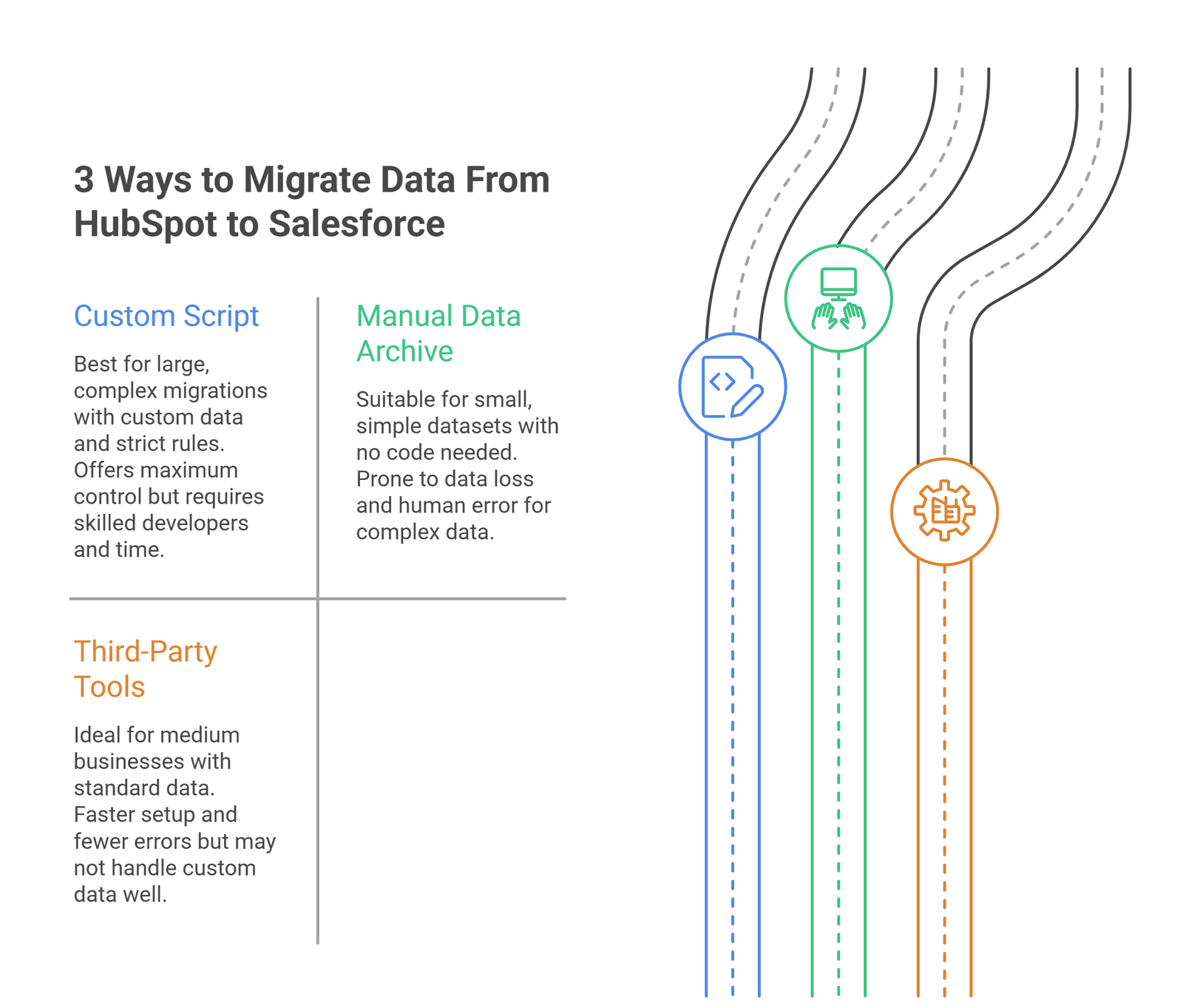
A custom script is the most flexible option. Here, developers write code to pull data from HubSpot and push it into Salesforce. Both platforms have strong APIs, so this approach is fully possible.
The big benefit is control. You decide exactly how each field maps. You can transform data in transit, clean it, and handle complex logic. So odd cases and custom objects are no problem.
This suits large or complex migrations best. If you have heavy data, many custom properties, or strict rules, scripts give the precision you need.
There are trade-offs, though. Scripts need skilled developers. They take time to build and test. So they cost more than simple tools.
This option fits businesses with complex data and a need for accuracy. Our developers build and test these scripts in a sandbox first to ensure a clean and safe migration.
Migrating to Salesforce from HubSpot manually is easier in theory. You export data from HubSpot as CSV files. Then you import those files into Salesforce using its data tools.
The appeal is clear. It needs no code and no extra software. For a small business with clean, simple data, it can work fine.
However, the limits show fast. CSV exports flatten your data. Associations between records can break. Complex fields and history often do not carry over well. So you risk losing structure and links.
Manual imports also invite human error. Mismatched columns, wrong formats, and duplicates are common. The more data you have, the higher the risk.
So this method fits only small, simple datasets. For anything complex, it tends to create cleanup work later.
We sometimes use a controlled version of this for archive data. However, for live records, a script or a proper tool is usually safer.
Third-party migration tools sit in the middle. They are built to move data between CRMs. So they offer more safety than manual work, with less effort than custom code.
These tools handle common mappings for you. They match HubSpot objects to Salesforce objects out of the box. Many keep associations intact and reduce manual steps. So they speed up standard migrations a lot.
The benefits are real. Faster setup. Fewer errors. Built-in checks. For medium businesses with fairly standard data, this is often the sweet spot.
There are limits, though. Tools follow set patterns. So highly custom data or unusual logic may not fit. In those cases, you still need scripts or expert help.
Therefore, the best approach is often a mix. Use a tool for the bulk, and custom work for the tricky parts. We pick and combine the right methods for your exact data.
Most migration challenges start before any data moves. So time spent planning pays off many times over.
Below are the key steps to prepare for a HubSpot to Salesforce migration:
Start with people, not data. Changing your CRM platform is a decision that concerns sales, marketing, service, and leadership. So everyone affected should have a voice early. This is the step teams skip most, and regret most.
Why does it matter? Because buy-in drives adoption. If teams help shape the new system, they use it. If the change is forced on them, they resist it.
Bring stakeholders together at the start. Ask each team what they need from the CRM. Capture their daily pain points and must-have features. Then use this to shape the build.
Leadership matters too. A clear sponsor keeps the project funded and on track. They also signal that the change is real and backed.
When teams own the change together, the rest of the process runs far more smoothly.
Before you move, confirm the move is right. A clear comparison between your current CRM platform, i.e., HubSpot, and your next potential CRM platform, i.e., Salesforce, protects you from a costly mistake. Map your needs against both platforms.
List what HubSpot does well for you today. Then list where it falls short. Common gaps include reporting depth, customization limits, and rising contact costs. These are the pain points teams report most.
Next, check Salesforce against the same list. Does it solve your real problems? Does it fit your budget and team skills? Do you really need the features it offers? Be fair about its trade-offs, too, like setup effort and the need for admin support.
The goal is a clear, evidence-based decision your whole team can back.
Your data decides how smooth the move from HubSpot to Salesforce will be. So analyze it first. Most teams are surprised by what they find.
Start by auditing what you hold in HubSpot. How many contacts, companies, and deals? What custom properties exist? Which are still used, and which are dead weight?
Look hard at data quality. Duplicates, blank fields, and outdated records are common. Old, messy data is not worth moving. Carry it across, and you simply move the mess.
This is the moment to clean. Decide what to keep, fix, archive, or drop. Standardize formats for dates, phone numbers, statuses, etc.
A clear view of your data also drives the mapping plan. You cannot map what you have not measured.
So invest time here. Clean, well-understood data leads to a clean migration. It also gives Salesforce AI and reporting a strong start.
Never move data without backing it up first. This is the simplest safety step, and the most important. If anything goes wrong, a data backup is your safety net.
Export everything from HubSpot before the migration begins. Contacts, companies, deals, tickets, notes, and engagement data. Store these files in a safe, secure place.
Why is this non-negotiable?
Because migrations can fail in ways you do not expect. Poor mapping, a broken import, or a wrong overwrite can lose data. With a backup, you can recover. Without one, you cannot.
A data backup also gives peace of mind. Your team can test boldly, knowing the original data is safe. So the whole project moves faster and with less fear.
Therefore, treat backup as step zero of the actual move. We take full, verified backups of both systems before any data transfer, so your records are always protected.
Now shape Salesforce before data arrives. This is where good planning becomes a working system. The goal is to build Salesforce around your process, not HubSpot's capabilities.
A common mistake is to copy HubSpot's flat setup straight across. This wastes Salesforce's real strength. Instead, design the data model properly. Set up Accounts, Contacts, Leads, and Opportunities the right way.
Then add what your business needs. Custom objects, custom fields, page layouts, and record types per team. Build validation rules so that bad data cannot get saved. Set up the sharing model so each role sees the right records.
Do this before migration, not after. Data should land in a system that is ready for it. Move first and build later, and you create rework.
So treat configuration as a core step. A system built around your real process drives adoption. Our team designs and builds this setup before any records move.
Test before you trust. This step catches problems while they are cheap to fix. So never go live without thorough testing first.
Start in a sandbox, a safe copy of Salesforce. Run a sample migration there. Move a small batch of data and check it lands correctly. Confirm fields, links, and records all map as planned.
Then test the system itself. Do automations fire correctly? Do reports show the right numbers? Do integrations sync as expected? Try the real tasks your team does daily.
Bring in real users for this. They spot issues you will miss. They also start learning the system early, which helps adoption later.
Fix every issue found, then test again. Repeat until the results are clean and stable.
Here’s a step-by-step guide for successfully migrating your CRM org from HubSpot to Salesforce.
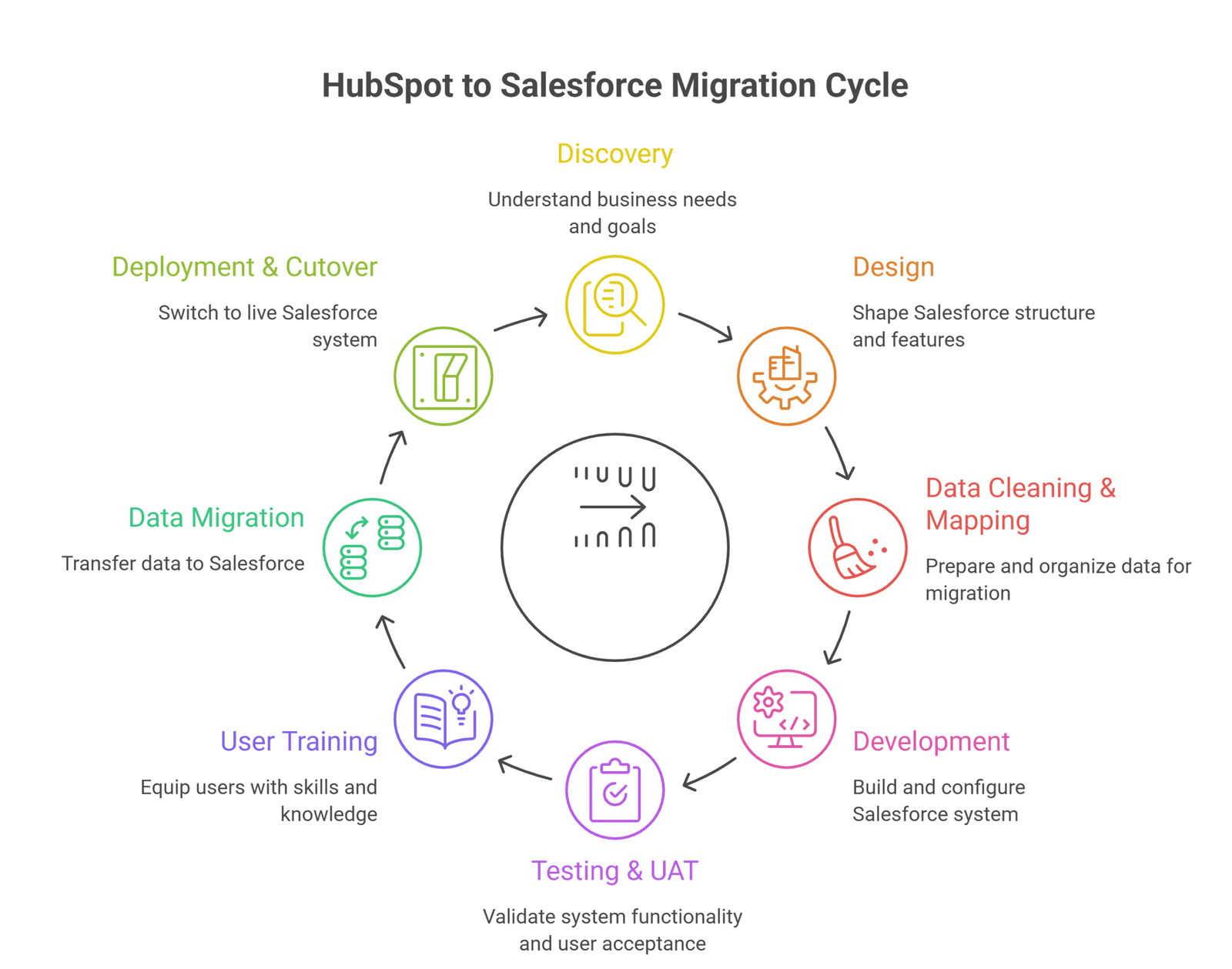
Before moving your CRM to Salesforce and developing anything, we learn how your business runs.
In this stage, we sit with your teams. We map your current processes in HubSpot. We capture how sales, marketing, and service actually work.
We also audit your data and integrations. What objects and properties do you use? What systems connect to your CRM? What reports does leadership rely on?
Then we define goals. What does success look like? What problems must the move solve? What must not break during the change?
The output is a clear plan. It covers scope, data, integrations, risks, and timeline. This becomes the blueprint for everything that follows.
So discovery prevents the biggest mistakes. A migration built on real understanding runs smoothly. One built on assumptions runs into issues fast.
Here, we shape how Salesforce will work for you.
We design the data model. Standard objects, custom objects, fields, and relationships. We make sure the structure fits your process, not a generic template.
We also design the field mapping. Every HubSpot property gets a clear home in Salesforce. This map is the backbone of the data move that comes later.
Beyond data, we plan automations, page layouts, and the sharing model. We decide what each team sees and does. We design integrations with your other systems, too.
Nothing is built yet. That is the point. Design lets us agree on the plan with you before any cost of building. Changes here are cheap and manageable. Changes after development are not cheap and difficult to execute.
This stage decides the quality of your new CRM. Clean data in, clean CRM out. So we treat this as one of the most important steps.
First, we clean. We remove duplicates, fix blank fields, and standardise formats. We archive or drop dead records. The aim is simple: move only data worth moving.
Then we map. Every HubSpot object and property gets matched to the right Salesforce object and field. Contacts and Companies map to Contacts and Accounts. Deals map to Opportunities. Custom properties map to custom fields.
We pay close attention to the tricky parts. Associations, picklist values, owners, and dates all need care. These are the common blind spots that break data.
We document the full map and review it with you. Then we test it on sample data.
So by the time real data moves, the path is clear and proven.
Now we build the CRM system designed earlier. Development is where Salesforce takes real shape. We turn our actionable plan into a working CRM platform.
We configure standard and custom objects. We add fields, page layouts, and record types. We set up the sharing model, so each role sees the right data.
Then we build automation. Flows handle your routine logic, like routing and alerts. Where needed, we add Apex code for advanced cases. So both simple and complex needs are covered.
We also build integrations. We connect Salesforce to your other systems, like finance, support, or your website. We set up any migration scripts here, too.
All of this happens in a sandbox, away from live data. So we can build and test safely, without causing any disruptions to your business.
Testing proves the solution we develop works before your team relies on it. UAT, or user acceptance testing, brings your team into this. So real users confirm the system fits their work.
We test in two layers. First, the technical checks. Do automations fire? Do integrations sync? Does the data map correctly in a trial run? We fix any issues found.
Then comes UAT. Your team runs their real tasks in the test system. They create records, move deals, run reports, and log cases. They tell us what works and what feels off.
This step is crucial for two reasons. It catches problems we cannot see from the outside. It also gets users comfortable before go-live, which boosts adoption.
We log every issue, fix it, and retest. We repeat until the system is clean and your team signs off.
So nothing goes live until it is proven and approved by your team
No matter how refined and feature-rich your CRM system is, it fails without trained users.
We provide comprehensive training to every team member, based on their role. Sales learns the pipeline and deals. Service learns cases. Marketing learns its tools and links. So each team member learns what matters to them.
We use the real, configured system for training. Your team works on the setup they will actually use regularly. So there is no gap between training and the live tool.
We also create simple guides and quick references. These help users after the sessions end. So they are never stuck without an answer.
Good training reduces fear and speeds adoption. People use tools they understand. They avoid tools that confuse them.
We don’t treat training as an afterthought. We want your team to be confident while using Salesforce and improve their workflows with it.
This is the moment the data actually moves. By now, everything is ready. The system is built, the map is tested, and backups are taken. So the move itself is quite controlled.
We run the migration using the method chosen earlier. A script, a tool, or a mix. We move data in a planned order, so relationships stay intact.
We move in stages where it helps. Accounts and Contacts first, then Opportunities, then activity and history. This keeps links between records correct.
After each batch, we check the results. Did record counts match? Did fields land correctly? Are associations intact? We fix any gaps before moving on.
Because we tested this path already, surprises are rare. The real move follows a proven plan.
So data migration is the careful execution of work done well upfront. Done right, your records arrive complete, structured, and ready to use in Salesforce.
Cutover is the switch to live. This is when Salesforce becomes your main CRM. So we plan it with care to avoid disruption.
We pick the right window. Usually a quiet period, like a weekend. So the change has the least impact on daily work.
Before the switch, we run final checks:
Only then do we go live.
We often run a short overlap, too. The old system stays available, read-only, for a while. So if a question comes up, the history is there.
After go-live, we stay close. We watch for issues and fix them fast. Early support is when most questions appear. So we are on hand for it.
Here are a few things you need to do after migrating from HubSpot to Salesforce so that your new CRM platform delivers great ROI:
Adoption is not a one-time event. It grows with ongoing support. So training should continue well after go-live.
Run regular sessions, not just a launch-day class. People forget. New talent joins. Features get added. Regular workshops keep skills fresh and confidence high.
Match these to real needs. Watch how teams use the system. Spot where they struggle. Then build short sessions around those exact gaps.
Plus, create power users within each team. These are people who know the system well. They help colleagues daily, so support feels close and quick.
Celebrate wins too. Show how Salesforce saves time or closes deals. When people see real value, they lean in.
So treat adoption as a habit you build over time. The more your team uses Salesforce well, the more value you get from the move.
Salesforce keeps growing, and so should your use of it. A regular audit makes sure you get full value. So review your setup on a set schedule.
Check what you use and what you ignore. Some features may go unused because teams forget them. Others may need tweaks to fit changed processes. An audit surfaces both.
Review new releases too. Salesforce ships updates three times a year. Each brings features that may help you. So check each release and adopt what fits.
Look at your data health as well. Are duplicates creeping back? Are fields being filled correctly? Regular checks keep data clean over time.
Also, retire what no longer helps. Old fields, dead automations, and unused reports add clutter. Clearing them keeps the system fast and simple.
Therefore, an audit is not a one-off. It is routine care. Done well, it keeps Salesforce sharp, clean, and matched to your business as it changes.
Testing does not end at go-live. Your CRM keeps changing, so testing must continue. New automations, fields, and integrations all need checks.
Every time you change the system, test it first. Use a sandbox for anything significant. So you catch issues before they reach live data and real users.
Watch your integrations closely. Connected systems update on their own schedules. An update on their side can break a link on yours. Regular checks catch this early.
Monitor reports and automations too. A small change can have knock-on effects. A report may quietly show wrong numbers. An automation may stop firing. Testing finds these before they cause harm.
Listen to users as well. They often spot odd behaviour first. So make it easy for them to flag issues.
A well-planned, expert-led HubSpot to Salesforce migration is crucial for moving your processes, data, and team onto a new, improved CRM system.
Providus is a certified Salesforce consulting and implementation partner. We have run this exact move for businesses across many industries. So we know where migrations go wrong, and how to keep yours on track.
Here are the steps our migration approach is grounded in:
We also handle the hard parts. Complex data mapping. Tricky integrations. Marketing data you do not want to lose. We protect your records with full backups and tested plans at every step.
After go-live, we stay with you. Through managed services, support, and maintenance, we keep your system healthy and growing.
So if you are ready to move from HubSpot to Salesforce, let us help you do it once and do it right. Talk to our certified team about your migration today.
Blogs & Insights
Design Trends / May 15, 2026

Experience / May 3, 2026