

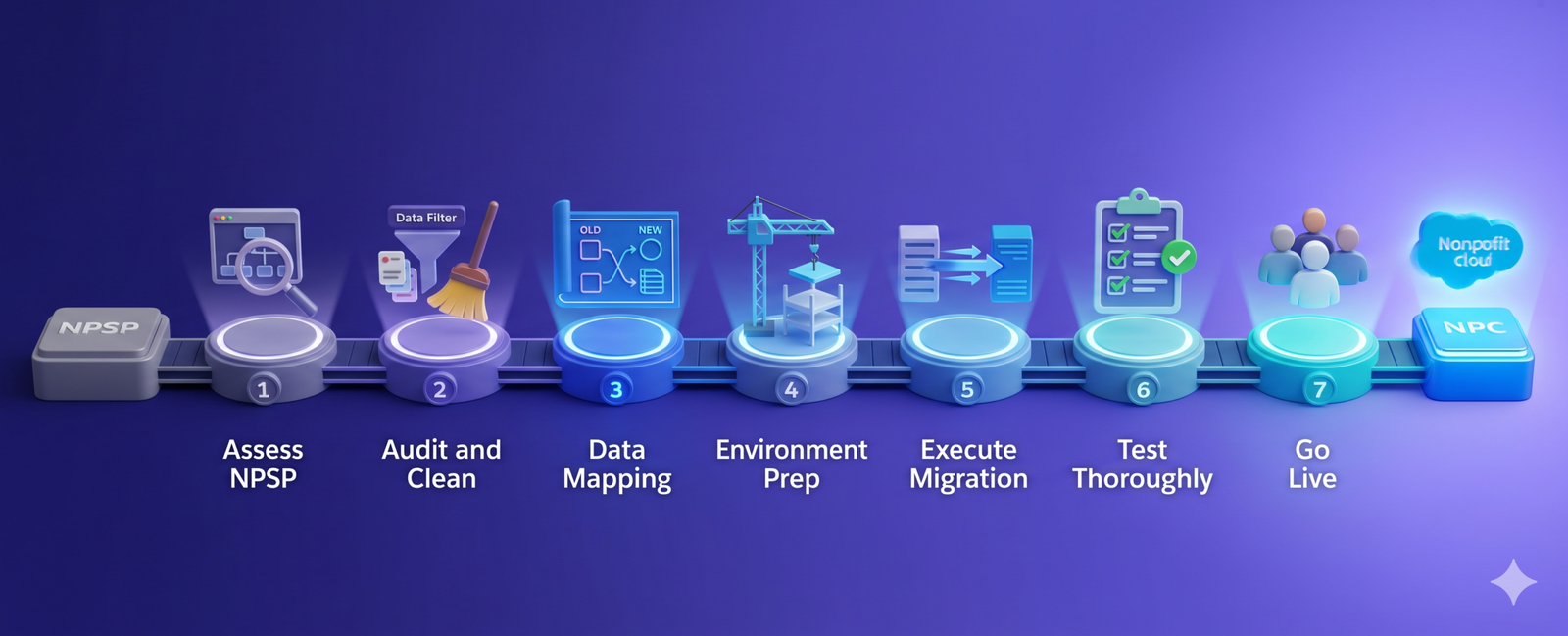
Since 2008, the Nonprofit Success Pack (NPSP) has been the reliable workhorse for thousands of organizations. But as their operations become more complex, a large number of charities are now looking forward to Salesforce Nonprofit Cloud (NPC).
Through a strategic Salesforce upgrade, often guided by a Salesforce nonprofit consultant, they address the gap between the mission’s potential and current tech limitations. NPSP-to-NPC migration is rarely simple. It requires careful planning, a clear migration strategy, and a thoughtful understanding of your data.
If done flawlessly, it protects the relationships your nonprofit has built over the years, ensures operational continuity, and unlocks powerful new capabilities.
In this guide, you will learn how to migrate from NPSP to Salesforce Nonprofit Cloud step by step. From evaluating your existing system to the final migration, we have covered everything.
Before beginning the NPSP to NPC migration, you must clearly understand what separates NPSP from Nonprofit Cloud. Both solutions operate within the Salesforce ecosystem, but they are built with different philosophies, architectures, and long-term capabilities. Knowing how they differ helps organizations prepare their data, workflows, and expectations before making the transition.
Built as an open-source package on the Salesforce platform, the Nonprofit Success Pack (NPSP) extends core CRM functionality. Because of its flexibility and community-driven development, many nonprofits adopted NPSP as a reliable solution.
However, in times of need, Salesforce began building a more modern platform specifically designed for mission-driven organizations. This led to the creation of Nonprofit Cloud, a next-generation solution.
Unlike NPSP, Nonprofit Cloud is built using modern industry cloud architecture. Charities deal with fundraising programs, service delivery, case management, and impact measurement under a single digital roof.
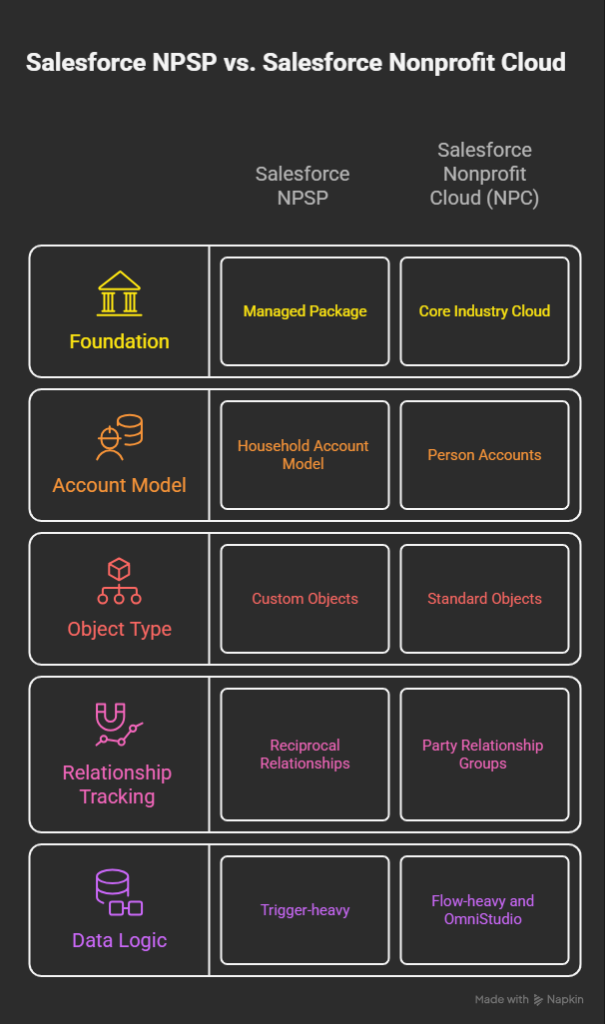
Feature | Salesforce NPSP | Salesforce Nonprofit Cloud (NPC) |
Foundation | Managed Package (installed on top) | Core Industry Cloud (Native) |
Account Model | Household Account Model | Person Accounts (Standard) |
Object Type | Custom Objects (e.g., Recurring Donations) | Standard Objects (e.g., Gift Commitments) |
Relationship Tracking | Reciprocal Relationships (Custom) | Party Relationship Groups (Standard) |
Data Logic | Trigger-heavy (TDTM framework) | Flow-heavy and OmniStudio |
Many organizations prefer to move to Nonprofit Cloud because it offers capabilities beyond traditional donor management.
First and foremost, it provides a unified data model. Instead of separating data associated with donors, programs, and beneficiaries across systems, nonprofits manage everything within one place. With expert Salesforce consulting services, organizations can structure this transition more efficiently.
Other than that, Nonprofit Cloud supports mission-driven program management. You may easily track services, outcomes, and impact without hesitation.
With advanced reporting and insights, it lets your leadership work with a clearer visibility into performance, engagement, and outcomes.
Last but not least, Salesforce is eagerly investing in Nonprofit Cloud to let organizations enjoy innovations without relying on third-party customizations.
The first step toward an effortless NPSP-to-NPC migration is to evaluate how your organization uses the current system. This assessment helps you understand what should be migrated, improved, or retired.
For instance, some organizations want better reporting, while others aim to improve automation or integrate additional digital tools. When your goals are clear, migration planning becomes easy. Focus on the following areas:
Not every field, report, or automation rule created in the past will remain necessary in the new system.
Over time, nonprofit databases tend to accumulate outdated information, duplicate records, incomplete donor profiles, and inconsistent field entries.
If organizations move this data directly into a new system, they risk carrying those problems forward. For this reason, nonprofits should conduct a comprehensive data audit before beginning the Salesforce data migration process.
This review typically includes donor records, donation histories, campaigns, program participation data, and engagement activities.
Your team should look for duplicate contacts, outdated addresses, incomplete donation records, and inconsistent naming conventions that could affect reporting accuracy.
Because Salesforce Nonprofit Cloud uses a more advanced, purpose-built architecture, many of the data objects used in NPSP may not exactly match the new system. This makes it important for chartiies to carefully analyze how information currently stored in NPSP will appear in the new platform.
For example, contact records may evolve into richer constituent profiles, while donation histories may integrate into broader fundraising engagement structures. Campaigns, volunteer activity, and program participation data may also align differently in the Nonprofit Cloud model.
These decisions ensure that relationships between records remain intact after migration. Without this step, you risk losing valuable context on donor relationships, engagement history, and program outcomes.
At this stage, you will have to build the structural foundation that will support incoming data.
The preparation for this typically starts with configuring the core data structures within Nonprofit Cloud.
Your teams define how contacts, donations, programs, and engagement activities will appear in the system. At the same time, permissions are in place to ensure that staff members can access the information relevant to them.
Organizations also take this opportunity to improve their automation processes. Workflows that previously handled tasks may be redesigned. It ultimately reduces technical issues and helps the Salesforce upgrade deliver value from the start.
It’s time to start the actual Salesforce data migration once planning, data cleanup, and environment preparation are done and dusted. Now, you have to transfer data from NPSP into the newly configured Nonprofit Cloud environment.
This process usually begins by extracting existing records from NPSP. Teams then transform the data to match the structure of the new Nonprofit Cloud data model. The data is later imported into the new system.
To handle this perfectly, many rely on tools such as Salesforce Data Loader, third-party migration software, or professional partners. If you do it carefully, data associated with donor histories, fundraising campaigns, and engagement remain intact even after a Salesforce upgrade.
Even when migration scripts and data mapping appear correct, there is still a dire need to verify in real-world scenarios. Right after data transfer, you should have several rounds of testing.
Thorough testing ensures that the Salesforce data migration achieves its goals and prepares you for a smooth launch.
Here comes the final stage of a successful Salesforce upgrade that focuses on people rather than technology. Even the most carefully executed migration cannot succeed if staff members don’t know how to use it.
You have to provide training sessions, user guides, and internal documentation to build confidence. The best practice is to start with administrators and key team leaders, then other staff members.
Once teams feel comfortable using the system, the organization can officially complete the transition fully to Nonprofit Cloud. This milestone will mark a new beginning for a more modern, scalable, and data-driven nonprofit.
Migrating from Salesforce NPSP to Nonprofit Cloud will be a strategic move to drive growth, improve efficiency, and deepen donor engagement.
Those who carefully plan NPSP-to-NPC migration, audit and clean your data, map it accurately and thoroughly, and test every workflow will easily ace it.
With this Salesforce upgrade, your nonprofit will make smarter decisions, better fundraising strategies, and improved program tracking. If your nonprofit wants to make this move efficiently and avoid pitfalls, tech experts can make all the difference.
Partnering with professionals ensures an uninterrupted nonprofit cloud transition, so that you can focus on serving your mission better.